
How to Go Viral on Pinterest in 2026 (7 Ways That Work)
Going viral on Pinterest isn't luck. Seven repeatable tactics — design, SEO, volume, cadence and tracking — that actually move pins in 2026.
By Pedro Campos
 Supapin
Grow your traffic with Pinterest
- Turn your pages into pins
- Rank in Pinterest search
- Drive clicks back to your site
No credit card required
TL;DR: Going viral on Pinterest takes strong design, real SEO, consistent posting, and tracking what works — done every single week. The strategy is simple. Doing it manually, week after week, is where most people fall off.
We have all been there: the pin you barely thought about takes off, while the one you spent an hour designing gets three saves and fades out. It feels random, but it isn't.
Going viral on Pinterest looks like luck from a distance. Up close, it's a search and discovery engine with patterns you can learn and repeat. Get the design, the SEO, and the publishing rhythm right, and you shift the odds hard in your favor.
Why Pinterest is still worth it in 2026
Pinterest hit 631 million monthly active users in Q1 2026, and it's still growing. This isn't the "recipes and wedding boards" app people remember.
- Gen Z is fueling the growth. They now make up over 42% of users, the fastest-growing group on the platform.
- Purchase intent is Pinterest's real edge. People come here to plan, not scroll. That intent is why Pinterest traffic often converts better than traffic from other platforms.
- Video is the new growth engine. Idea Pins and short video content are getting pushed harder by the algorithm, and creators leaning into video are seeing bigger reach than those sticking to static images.

What "going viral" actually means on Pinterest
A pin can compound for months, sometimes years, after you publish it. It doesn't work like an Instagram reel or a TikTok that trends for 48 hours and fades. Pinterest, like Google, is a search engine, and pins rank the way web pages do.
So going viral on Pinterest means one of two things:
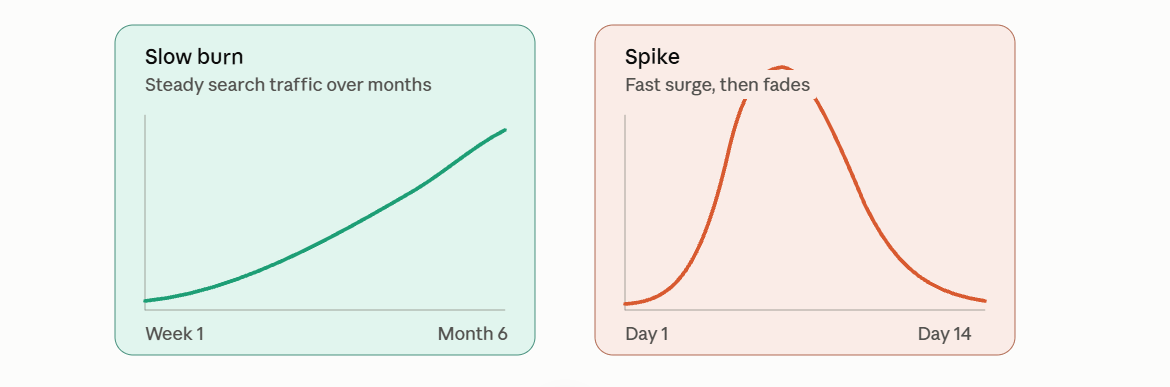
A slow burn: a well-optimized pin that Pinterest keeps surfacing in search and related feeds for a long time, generating steady traffic.
A spike: a pin that catches a trend or a seasonal wave and gets picked up by Pinterest's recommendation engine fast, creating a short-term surge in impressions and saves. Once the trend passes, so does the spike.
The tactics below help you get both.
1. Design pins that stop the scroll
Pinterest is a visual medium first. Before anyone reads your title, they react to the image.
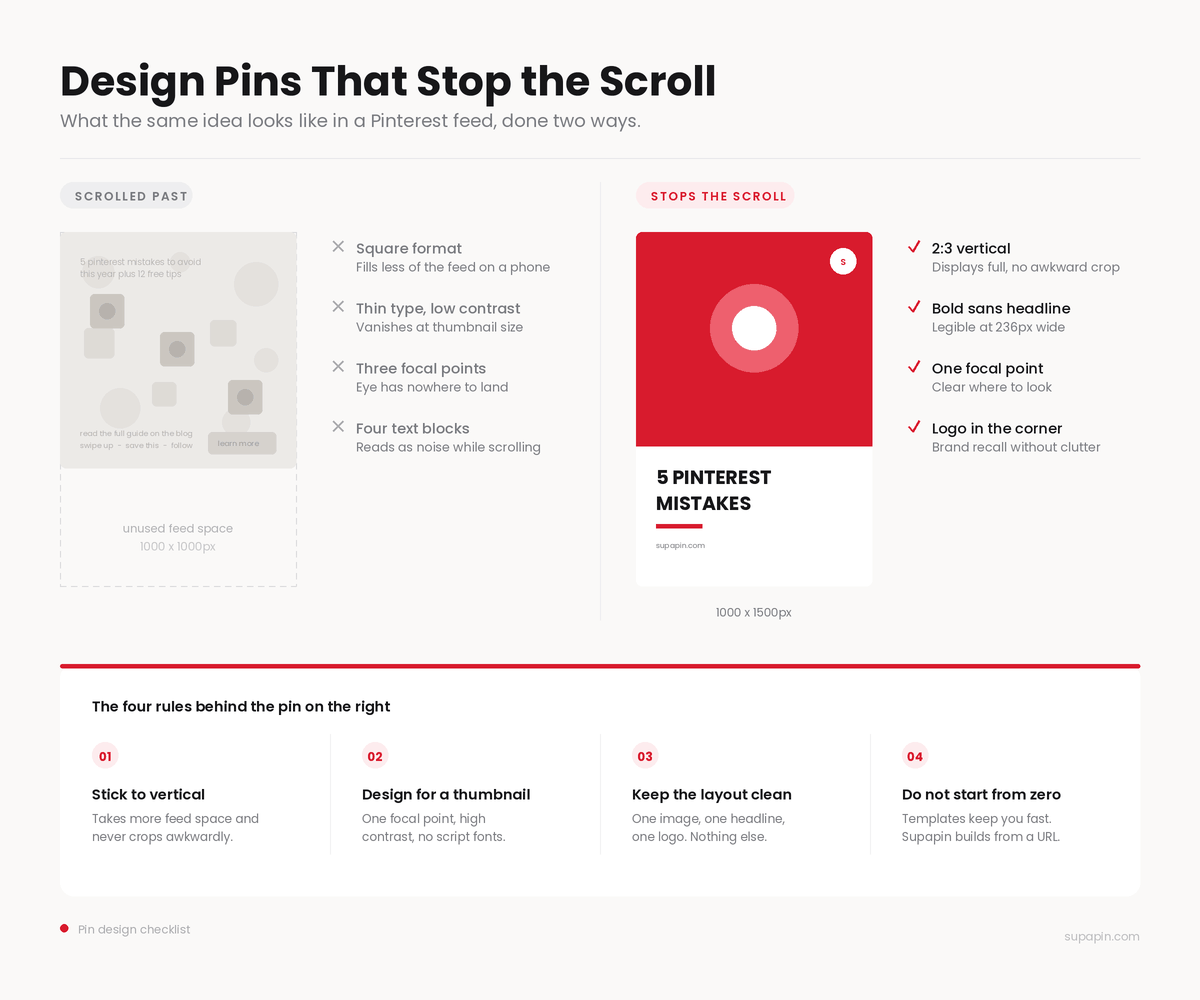
Stick to the vertical format. Use a 2:3 aspect ratio — 1000 x 1500px is the safe bet. This shape takes up more space in the feed and displays fully without awkward cropping. Square or horizontal pins get squeezed down visually and scrolled past. Our guide to Pinterest pin sizes covers every format in detail.
Design for a thumbnail, not a poster. Most people see your pin small, on a phone, while scrolling fast. Use one clear focal point, high contrast between text and background, and a headline font that's readable at a glance. Avoid thin script fonts for your main message.
Keep the layout clean. One strong image, one short headline, your logo in a corner for brand recognition. Multiple text blocks, busy backgrounds and too many icons make people scroll past instead of stopping.
Don't design each pin from scratch. This is where most people waste time they don't have. Templates save time and keep things consistent, but if you never customize them, your pins end up looking like everyone else's. Our free Pinterest pin maker turns a URL into a finished pin in seconds if you want to see the difference.
2. Build a real content strategy, not just pretty pins
A stunning pin without a plan behind it is a gamble. An average pin that's part of a real strategy is much more likely to work, because the system behind it is doing the heavy lifting.
Know who you're making pins for. Sketch out your ideal audience: their interests, the problems they're solving, what stage of decision-making they're in when they find you. A recipe blogger's audience wants inspiration and instructions; an ecommerce store's audience wants to compare and buy. Frame your content accordingly.
Plan around what's already trending. Pinterest publishes trend data every year, and seasonal content — holidays, back to school, new year planning — outperforms evergreen content inside its window. A simple content calendar that maps your existing pages to upcoming seasonal moments beats creating something new every time a trend appears.
Pin what you already have. You don't need new content to create new pins. Every blog post, product page, and landing page on your site is ready-to-use pin material. Most sites are sitting on far more of it than they realize.
3. Treat Pinterest SEO like real SEO
This is the part people skip, and it's what separates a pin that gets seen for a week from one that keeps ranking for months.
Put your keyword in the title, near the front. Pinterest's search works like Google's: it matches your title, description and board names to what people type into the search bar. A specific title with the keyword up front beats a vague, clever one almost every time.
Write descriptions for humans and the algorithm. Don't dump keywords. Describe what the pin is, who it's for, and why it's worth saving, while naturally including two or three relevant terms. An overstuffed description gets skipped by Pinterest and by the person scrolling.
Don't skip alt text. Pinterest indexes it as another SEO signal, and it's one of the most commonly ignored fields on a pin.
Pick boards on purpose. Which board you pin to affects which searches and related feeds you show up in. A mismatched board can quietly cap a pin's reach before it ever has a chance to trend.
Writing genuinely good, keyword-led titles and descriptions for every pin is tiring, which is why most people either skip it or paste the same three phrases everywhere. Our title and description generator drafts both from the page you're pinning.
4. Multiply every piece of content into several pins
One page doesn't have to mean one pin. Pinterest rewards variety, and multiple angles on the same content is one of the surest ways to get more visibility.
- Vary the visuals. Different image, different palette, different headline angle, same underlying page.
- Space them out. Don't publish five pins for the same URL in the same hour. Let each one get its own moment in front of the algorithm.
- Write a fresh description each time. Reusing identical text wastes a chance to rank for a different keyword variation.
- Pin to every board where it's genuinely relevant. Each board reaches a different slice of your audience.
- Watch which version wins, and let that shape your next batch.
Manually producing four or five distinct pins per page is where most Pinterest strategies quietly die. It's the exact problem automation was built to solve: pick a page, generate multiple pin styles from it, publish or schedule each one without redoing the design work every time.
5. Post on a schedule, not when you remember
Consistency is one of the strongest levers you control. Pinterest's algorithm favors accounts that publish regularly over accounts that post in bursts and go quiet.
Find your audience's active windows. Late morning, lunchtime and evening tend to be strong general windows, but your actual audience's peak times show up in your analytics. Use those instead of guessing.
Batch your pin creation, then schedule it out. Sitting down once a week to queue up pins is far more sustainable than remembering to post daily. This is also where manual strategies fall apart: designing pins by hand is doable, but keeping a real cadence — several times a day, every day — isn't something most people sustain for long.
Automate the publishing, not just the design. Once pins are ready, scheduling can queue them for your best times automatically, with no logging into Pinterest every day to hit publish.
6. Grow your following so your pins have an audience to land on
A great pin still needs an audience. A few habits that help:
- Cross-post trending pins to your other social platforms, tailoring the caption to each one, to pull people back to your Pinterest profile.
- Engage like a person, not a brand account. Follow, save and comment on content in your niche instead of only broadcasting your own.
- Collaborate with other creators or brands in your space, including group boards, to reach an audience you haven't yet.
- Respond to comments and save promptly. Pinterest engagement compounds when people see an active account behind the pins.
7. Track what's working and double down
Virality isn't a single formula. It's a pattern specific to your audience, and you only find it by measuring. Keep an eye on:
- Impressions vs. saves vs. clicks. Impressions show reach, saves show resonance, clicks show real traffic. A pin can win on one and lose on another.
- Which templates and colors perform best for your specific audience.
- Which boards and keywords are actually driving your top pins.
This is the step that turns "we got lucky once" into "we know how to do this again."
The real formula
Nobody has cracked a fixed formula for going viral on Pinterest. But the pattern holds: strong vertical design, real SEO in your titles and descriptions, multiple pins per piece of content, consistent posting, and paying attention to what worked so the next batch is better.
Most of that is simple in theory and tedious in practice, which is exactly why it rarely happens consistently by hand. Supapin turns any page on your site into a polished, SEO-optimized pin in seconds, writes the title and description, and publishes or schedules it to Pinterest — so the strategy above becomes something you actually do every week, not just something you know you should be doing.
Ready to grow your traffic with Pinterest?
Turn the pages you already have into pins that send traffic back to your site.
Start for freeRelated Posts
Pinterest SEO in 2026: How Pinterest Actually Decides Which Pins Get Found
How Pinterest search works in 2026: where keywords count, why the image and board matter, and what your website has to do with ranking.
BlogToPin vs Pinterest Scheduler vs Supapin: Which Fits You?
Pinterest's native scheduler, BlogToPin and Supapin compared: what each one automates, real pricing, and a straightforward way to decide which fits your workflow.
Tailwind vs Pin Generator vs Supapin: Which Fits Your Workflow?
A practical comparison of Tailwind, Pin Generator and Supapin: what each tool automates, what you still manage yourself, and which workflow fits your site.